What is an AI chief of staff? An AI chief of staff is an AI system set up to do the coordinating work around a founder: sorting the inbox, writing a daily briefing, preparing you for meetings, tracking follow-ups and reporting what moved. It works from written rules that say what it may do alone, what it drafts for your approval, and what stays with you.
That is the short answer. The longer one is that most of what gets sold under this name is a tool, and a tool is the easy part. The hard part is deciding what the thing is allowed to do. Founders who skip that step end up with one of two results: an assistant so restricted it saves no time, or one with access to everything and no rules.
Here is what an AI chief of staff does, where it stops, a simple way to set its authority, and how to set one up in a week.
Where does the idea come from?
A human chief of staff is the person who keeps a leader's attention on the right things. In Harvard Business Review, Dan Ciampa makes the case that CEOs need more support than an executive assistant can offer, because the day-to-day running of the office gets neglected while the CEO works on strategy, the leadership team and culture.
Most founder-led businesses cannot justify that hire. So the coordinating work lands on the founder: reading everything, remembering everything, chasing everything. An AI chief of staff is an attempt to give that work to software that can read, summarize, draft and follow rules.
What does an AI chief of staff actually do?
The useful ones do a short list of jobs, every day, without being asked:
- Inbox triage. It reads what came in, sorts it by what needs you, what needs someone else and what needs nobody, and drafts replies to the routine ones.
- A daily briefing. One page each morning: what is on the calendar, what changed since yesterday, what is waiting on you and what is overdue.
- Meeting prep. Before a call, it pulls together who you are meeting, the last few exchanges and the open items, so you walk in knowing where things stand.
- Follow-up tracking. It keeps a list of what you promised and what was promised to you, and flags the ones going stale.
- A weekly report. What got done, what slipped and what is coming, in the same format every week.
Notice what these have in common. They are high frequency, rule based and screen heavy. That is the test I use for any automation target, and coordination work passes it more often than founders expect.
What can an AI chief of staff not do?
It cannot carry your judgment into a room. A good human chief of staff can tell you the hard thing because they have earned the right to say it. Software can assemble the same facts, but it does not have that relationship with you or with your team.
It also knows only what is written down. If your priorities, your pricing rules and your opinions about clients live in your head, the AI works from guesses, and its output reads that way. This is the same problem that keeps a business from running without its founder: nothing can be handed off until it exists somewhere outside your head.
And it should not own decisions that are expensive or hard to undo. Hiring, firing, pricing a major deal, a difficult client conversation: those stay with people.
Is an AI chief of staff a product you buy or a system you build?
Either, and the answer matters less than people think. There are three common routes:
- A packaged product. You connect your email and calendar and it does a fixed set of jobs. Fast to start, limited to what the product was designed for.
- A general AI assistant with your own instructions. You write down how you work and what you want each morning, and run it yourself. It costs little to try and it teaches you what you actually need.
- A custom build. Agents and automations wired into your own tools, with your rules. More work up front, and it fits the way your business really runs.
Whichever route you take, the same two things decide whether it works: the context you give it and the authority you give it. Neither one comes in the box.
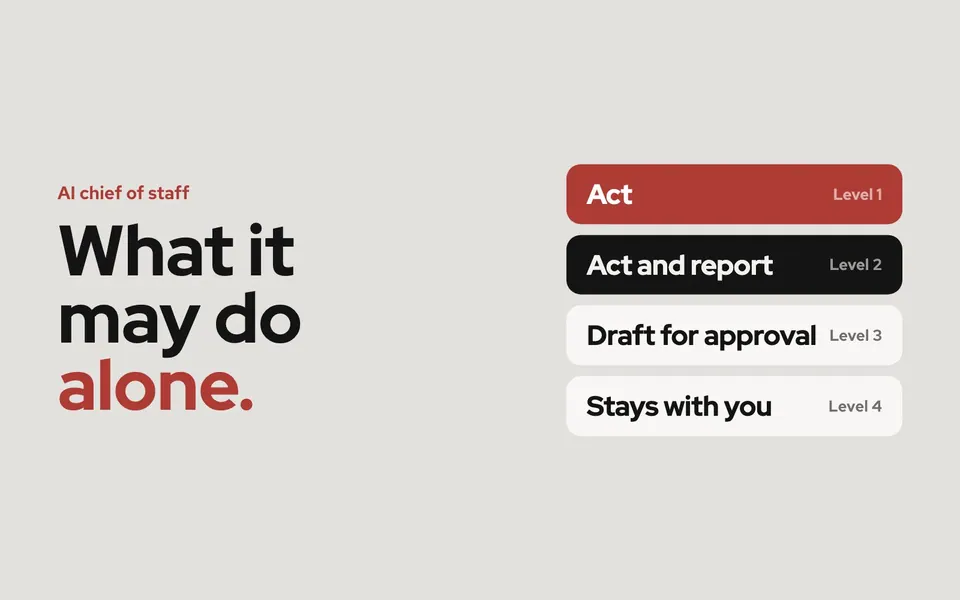
The four levels of authority to give an AI chief of staff
I sort a team's decisions into four levels in a decision rights framework. The same idea works for an AI, with one change: the levels describe actions, not decisions.
| # | Level and what it means |
|---|---|
| 1 | Act: It does the task and you never see it. Filing, labeling, logging a call note, updating a tracker. |
| 2 | Act and report: It does the task and lists it in the daily briefing. Accepting a routine meeting inside your set hours, sending a reminder you already approved the wording for. |
| 3 | Draft for approval: It prepares the work and waits. Replies to clients, anything with a number in it, anything that goes out under your name for the first time. |
| 4 | Stays with you: It may gather the facts, and that is all. Money, people decisions, legal matters and anything hard to undo. |
Start almost everything at level 3. Move a task down a level only after you have approved its drafts for a couple of weeks without changing them. That is how trust gets earned with a new hire, and it is how it should be earned here.
How does a founder set up an AI chief of staff?
You do not need to connect everything on day one. You need one job done well, then the next one.
- List the coordinating work. For one week, write down every time you sorted, summarized, chased, scheduled or reminded. Do not judge the list yet.
- Pick the jobs that repeat. Circle the ones that are high frequency, rule based and screen heavy. If you have already sorted your work with a delegation matrix, these are the tasks sitting in the automate box.
- Write the context down. One page: your priorities this quarter, the people and accounts that always come first, what counts as urgent, and how you write. This page does more for the quality of the output than any setting.
- Start read-only. Give it access to read your email and calendar and produce a daily briefing. Nothing gets sent, moved or deleted. You are checking one thing: does it understand what matters?
- Add drafting. Once the briefing is right most mornings, let it draft replies and follow-ups for you to approve. Correct the drafts and feed the corrections back into your context page.
- Assign levels and limits. Put each job at one of the four levels above. Add limits where they apply: which calendars, which senders, which hours.
- Review it every week. Fifteen minutes. What did it get wrong, and which rule was missing? Every mistake points at a line to add.
Common mistakes when setting one up
- Connecting everything first. Access to every tool with no rules is how you get an embarrassing email sent in your name. Add one source and one job at a time.
- Skipping the context page. Without it, the briefing is a list of everything, and a list of everything is your inbox again.
- Automating a mess. If nobody on your team knows who owns a follow-up, an AI will not know either. Fix the handoff, then automate it.
- Checking all of its work forever. If you still read every email it already sorted, nothing moved. It is the same habit as micromanaging a team, pointed at software.
- Nobody owns it. Rules go stale. Someone has to own the context page and the weekly review, even if that someone is you.
How do you know it is working?
Measure what reaches you, not what it produced. Count the messages you had to read yourself this week and the follow-ups you had to remember without help. If both numbers are falling and nothing important was missed, it is working.
Then look at where the time went. The point is not a cleaner inbox. The point is that the hours you spent coordinating go back to the work only you can do: direction, key relationships and the people who lead others.
Where to start this week
If you only do one thing: write the one-page context and have an AI assistant produce tomorrow morning's briefing from your calendar and inbox, read-only. You will learn more from correcting that one page than from comparing ten tools.
If you would rather have it designed, built and kept running for you, that is the work my team does at Ironbridge AI Advisory: we find the work worth automating, build it, and keep it running.
Frequently asked questions
What is an AI chief of staff?
An AI chief of staff is an AI system set up to do the coordinating work around a founder or executive: sorting the inbox, writing a daily briefing, preparing for meetings, tracking follow-ups and reporting what moved. It works from written rules about what it may do alone, what it drafts for approval and what stays with the person.
What does an AI chief of staff do every day?
It reads what came in, sorts it by what needs you and what does not, drafts routine replies, writes a one-page morning briefing, prepares notes before each meeting and keeps a list of open follow-ups. Once a week it reports what got done, what slipped and what is coming.
Can an AI chief of staff replace a human chief of staff or executive assistant?
No. It can take over the reading, sorting, summarizing and drafting that fill much of the role. It cannot hold a relationship, read a room or tell you something hard and have it land. Decisions about money, people and anything hard to undo should stay with a person.
Is it safe to give an AI chief of staff access to my email and calendar?
Start with read-only access so it can brief you without sending, moving or deleting anything. Then allow drafts that you approve before they go out. Give it the right to act alone only for routine tasks, one at a time, after its drafts have needed no changes for a couple of weeks.
How much authority should I give an AI chief of staff?
Sort every task into one of four levels. Act: it does the task and you never see it. Act and report: it does the task and lists it in the daily briefing. Draft for approval: it prepares the work and waits. Stays with you: it may gather the facts, and that is all. Start almost everything at draft for approval, and move a task down a level only after you have approved its drafts for a couple of weeks without changing them.
What work should a founder hand to an AI first?
Start with coordinating work that is high frequency, rule based and screen heavy: inbox triage, a daily briefing, meeting prep and follow-up tracking. Begin with one job, read-only, and add the next one once the first is right most mornings. Hiring, firing, pricing a major deal and difficult client conversations stay with people.
Is an AI chief of staff a product you buy or a system you build?
Either. There are three common routes: a packaged product that connects to your email and calendar, a general AI assistant that runs on your own written instructions, and a custom build wired into your own tools. Whichever route you take, the same two things decide whether it works: the context you give it and the authority you give it.